Как создать рекламный AI-ролик со своим персонажем и продуктом
Пошагово собираем рекламный AI-ролик со своим лицом и продуктом в Seedance 2.5.
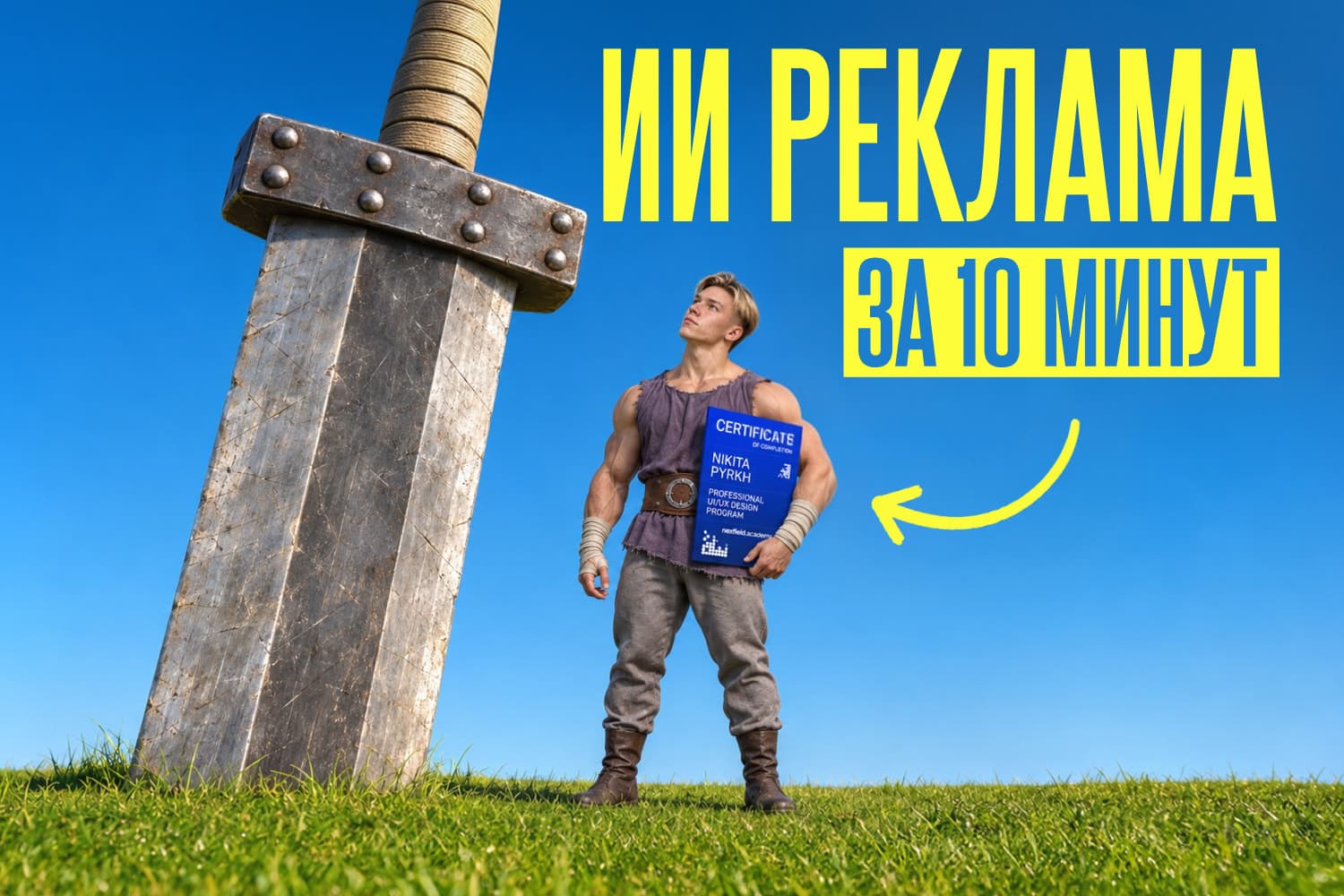
Как я превратил мем по «Берсерку» в рекламу Nexfield Academy. Покажу, как повторить этот подход со своим лицом и продуктом: подготовить референсы, собрать 15-секундное видео в Higgsfield и довести его в монтаже. Все промты для изображений и видео есть прямо в статье.
Шаг 1. Выбери идею и свяжи её с продуктом
Нам нужно было рассказать об обновлении Nexfield Academy: в личном профиле теперь можно собрать портфолио, резюме и сертификаты и поделиться всем одной ссылкой. Функционал уже доступен, так что залетай и создавай свой профиль.
Для рекламы я взял мем, в котором огромный воин с мечом переживает из-за грамоты и медали. Сертификат академии естественно вписался в эту шутку.
Сначала сформулируй, что именно ты рекламируешь и почему продукт должен появиться в выбранной сцене. В моём случае зритель видит тренировку с мечом, слышит «Грамота! Медаль!», а затем герой показывает сертификат и произносит рекламную реплику. У сцены есть подводка к продукту, поэтому финал продолжает шутку.
Этот приём можно адаптировать под другой бренд. Сохрани героя и ситуацию, замени предмет в руках и перепиши финальную фразу под свой продукт.
Шаг 2. Разложи ролик на кадры
До генерации я намечаю четыре смысловых кадра: показываю действие целиком, приближаюсь к герою, усиливаю эмоцию деталью и заканчиваю продуктом. В финальном промте к ним добавлен подъём камеры к небу. Получается пять временных отрезков на 15 секунд.
| Время | Что происходит | Задача кадра |
|---|---|---|
| 0–3,4 с | Общий план тренировки и два удара с криками «Грамота!» и «Медаль!» | Показать место и запустить шутку |
| 3,4–4,8 с | Герой делает третий удар перед объективом | Приблизить зрителя к действию |
| 4,8–5,7 с | Деталь глаз и напряжённого выражения лица | Поддержать эмоцию |
| 5,7–13 с | Герой сидит с сертификатом и говорит в камеру | Связать сцену с Nexfield Academy |
| 13–15 с | Камера поднимается от героя к небу | Завершить ролик |
Для работы я использую GPT для изображений, GPT или Claude для подготовки и правок текста промта, Seedance 2.5 в Higgsfield для видео и видеоредактор для голоса и звука. Начни с четырёх материалов: листа персонажа, чистой локации, отдельного меча и изображения своего продукта.
Шаг 3. Создай лист персонажа по своему фото
Лист персонажа помогает удержать внешность, одежду и пропорции героя при смене планов. Загрузи своё чёткое фото в генератор изображений. Можно добавить несколько ракурсов, если на них один и тот же человек. Затем используй промт ниже и выбери горизонтальный формат 16:9.
Я собираю на одном листе крупный портрет, вид спереди и вид сзади. Рядом с фигурой добавляю меч, чтобы сразу задать его дизайн и масштаб.
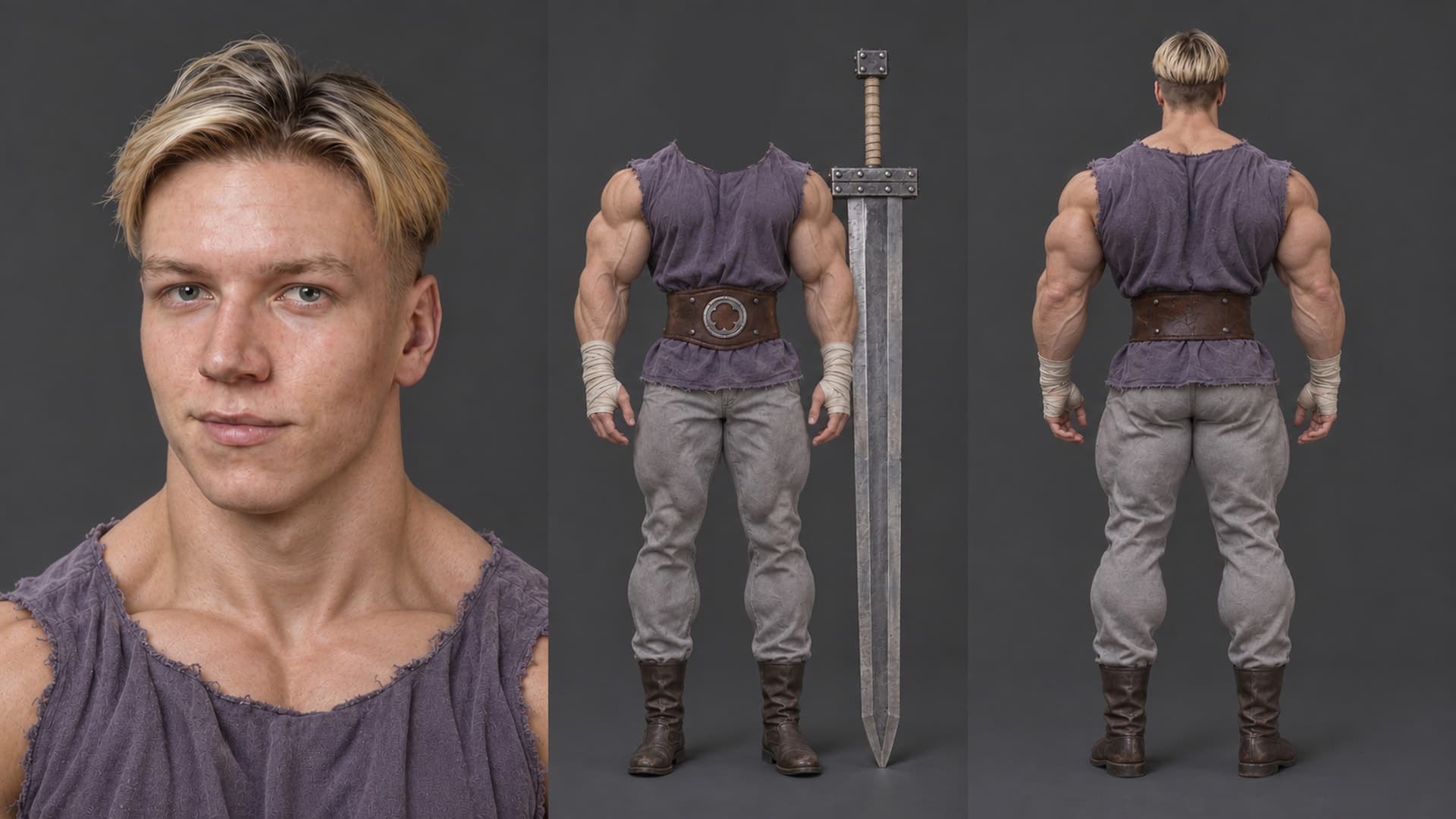
Лист персонажа с портретом, одеждой и огромным мечом.
На моём исходном листе центральная фигура намеренно показана без головы. В промте для повторения ниже оба ростовых вида полные, а внешность берётся с твоего фото. Телосложение тоже задано более сдержанным, чем у героя на иллюстрации. Это адаптация под собственного персонажа.
Промт 1 · лист персонажа (GPT)
Используй промт
Create a photorealistic character reference sheet using the uploaded photographs as the identity reference for ONE person. Preserve that person's recognizable face, facial proportions, age, skin tone, eye color, hairstyle and hair color. If several photographs are provided, they all show the same person and should be combined to preserve identity accurately. Landscape 16:9 composition with three clear views on a continuous neutral medium-dark gray seamless studio background: - Left: a large detailed head-and-upper-chest portrait, taking about 38 percent of the sheet. - Center: the same character in a complete full-body front view. - Right: the same character in a complete full-body back view. Both full-body views show the entire character from hair to boot soles at the same scale, standing straight in a relaxed neutral reference pose. Give the character a natural, fit athletic physique with moderate muscle definition: moderately broad shoulders, developed but medium-sized arms, a natural chest and back, lean waist and athletic legs. Preserve the person's individual proportions. Keep muscle volume realistic and restrained. Dress the character in a muted indigo-purple rough sleeveless tunic with raw edges, a very wide brown leather waist belt with a circular silver quatrefoil emblem, light gray trousers, off-white cloth hand and wrist wraps, and simple dark brown medieval leather boots. The same outfit must be consistent in all three views. Show its back construction clearly. Include one enormous steel greatsword standing vertically beside the front-view figure, tip on the floor, without obscuring the body. The sword has a broad straight double-edged blade, a rectangular dark steel guard with round rivets, a long cream cloth-wrapped two-handed grip and a square riveted pommel. Its overall length is about 1.25 times the character's standing height. Keep the entire sword inside the frame. The large portrait must strongly preserve the uploaded person's facial identity and show the purple tunic at the shoulders. Use even neutral studio lighting, realistic skin, cloth, leather and metal textures. Clean reference-sheet photography, consistent anatomy and proportions across all views. No labels, lettering, watermark, dramatic scenery or additional people.
Проверь лицо, одежду и пропорции во всех видах. Если они расходятся уже на листе, исправь референс до перехода к видео.
Шаг 4. Подготовь локацию, меч и продукт
Локацию я генерирую без людей и предметов. Здесь это старая каменная лестница в зелёном парке. Между двумя пролётами нужна широкая ровная площадка: на ней герой сможет стоять и размахивать мечом.
Отдельно создаю референс меча. Даже если он уже есть на листе персонажа, самостоятельное изображение позволяет явно сослаться на его форму, материалы и размеры. В моём примере общая длина составляет около 220 см, длина клинка 165 см, ширина 22 см.
Сертификат я загружаю готовым изображением. Если повторяешь сцену с другим продуктом, подготовь его отдельный референс с хорошо видимыми деталями и упаковкой.
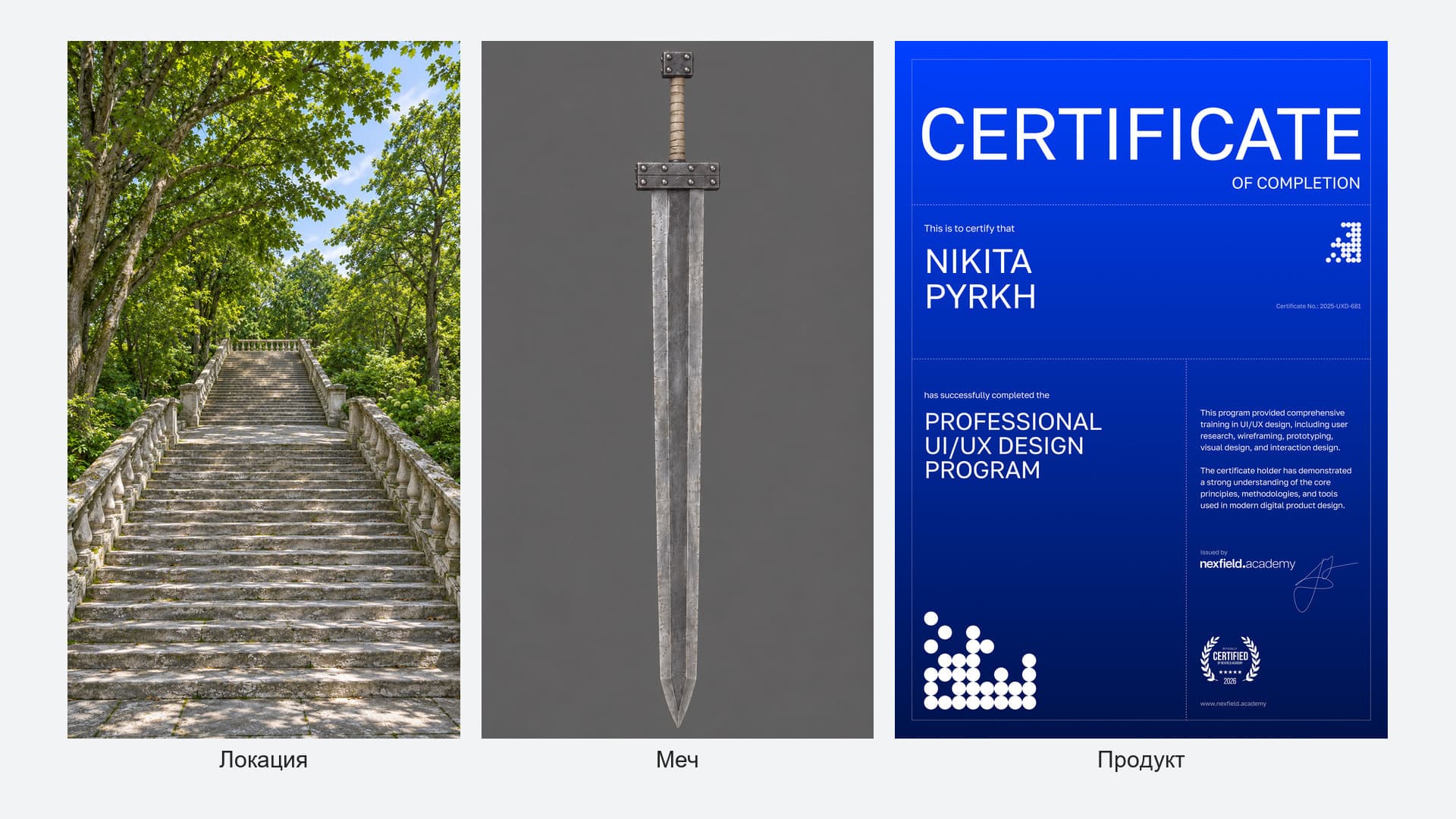
Три отдельных референса для видео: лестница, меч и сертификат.
Промт 2 · локация (GPT)
Формат 9:16. Дополнительное изображение не требуется.
Используй промт
Create a photorealistic outdoor environment plate, vertical 9:16, showing a long old stone staircase route through a lush wooded garden in natural summer daylight. The camera is positioned at the lower approach, looking uphill from a distance. Show a broad lower flight of weathered pale-gray limestone steps rising from the foreground to a clearly visible rectangular, level stone-paved intermediate landing. Beyond this landing, a second long flight continues uphill toward a distant upper terrace. Make the intermediate landing deep and wide enough for an adult to stand in a wide stance and practice with a very long sword. Keep its horizontal surface clearly readable and unobstructed. The lower flight, flat landing and upper flight must form one believable continuous walking route. Elegant old limestone balustrades border both sides of the staircase. Use thick flat handrails, repeating substantial vase-shaped stone balusters and square stone posts at the transition between stair flights and landing. The balustrades recede uphill with coherent perspective. The center walking route stays open. Tall mature deciduous trees and dense green foliage surround the stairs. Large branching trunks and a leafy canopy frame the scene, with patches of pale blue sky visible above. Show approximately 25–35 visible steps across the route, separated by the intermediate landing. Natural bright daylight and soft dappled shadows. Realistic pale-gray stone, subtle chips and wear, a little moss and grass in joints, scattered small leaves and believable summer greenery. The staircase and landing occupy the lower two-thirds of the vertical image, with tree canopy and sky above. Detailed photographic realism and natural colors. Empty environment. No people, silhouettes, weapons, animals, buildings, red annotations, text, interface elements or watermarks.
Промт 3 · меч (GPT)
Формат 9:16. Можно приложить лист персонажа, чтобы согласовать дизайн меча.
Используй промт
Create a standalone photorealistic prop reference image of ONE enormous steel greatsword. If a character sheet is attached, use its sword as the design reference and preserve its visual construction. Portrait 9:16 canvas, uniform neutral medium-gray studio background, soft even studio lighting. Center one sword upright, pommel at the top and blade point at the bottom. Show the entire sword with comfortable margins in a straight-on orthographic broadside view, with no foreshortening. The sword has an enormous straight double-edged silver-gray forged steel blade, long mostly parallel sides tapering near the sharp point, beveled edges and subtle worn metal texture. Use a simple rectangular dark steel crossguard with visible round rivets, a long cream cloth-wrapped two-handed handle, and a chunky square riveted steel pommel. Intended physical dimensions: 220 cm overall length, approximately 165 cm blade length, approximately 22 cm blade width, with the remaining 55 cm forming the hilt assembly. The sword is about 1.25 times the standing height of its wielder. Preserve a broad, heavy fantasy greatsword silhouette and coherent solid construction. Precise realistic product reference photography for consistent video generation. No person, hands, body parts, silhouettes, additional objects, floor stand, measurement arrows, scale bars, lettering, watermark, collage or multiple views.
Перед генерацией проверь, что площадка между пролётами хорошо читается, меч полностью помещается в кадр, а изображение продукта достаточно чёткое. Для сертификата новый промт не нужен: используй свой готовый файл.
Шаг 5. Добавь референсы в Higgsfield
Перехожу в раздел «Видео» в Higgsfield, выбираю Seedance 2.5 и добавляю подготовленные изображения в Elements через плюс. Каждому материалу задаю имя, на которое затем ссылаюсь в промте через @.
| Материал | Имя в промте | Что он задаёт |
|---|---|---|
| Лист персонажа | @char_nikita | Лицо, одежду и телосложение |
| Чистая лестница | @loc_staircase | Пространство и дневной свет |
| Сертификат | @prop_certificate | Вид продукта в рекламном кадре |
| Меч | @prop_sword | Форму, материалы и масштаб меча |
Имена элементов в интерфейсе и в тексте должны совпадать. Если назовёшь персонажа @char_student, замени все вхождения @char_nikita в промте. Само имя @char_nikita не подменяет твою внешность моей: её задаёт загруженный лист.
Для своего персонажа также замени blond hairstyle на hairstyle and hair color from the character reference. При необходимости адаптируй man, he, his и adult male voice. Остальные ссылки меняй одинаково во всём тексте.
Шаг 6. Сгенерируй черновик по полному промту
Выставляю вертикальное соотношение сторон 9:16, длительность 15 секунд и режим Seedance 2.5 Draft. Сначала проверяю сцену в черновике, потому что ошибка в полном качестве обходится дороже.
В показанном разборе такая генерация стоила 45 кредитов в Draft и 240 кредитов в 1080p. Перед запуском проверь стоимость в своём интерфейсе: она может измениться. Подробнее этот подход я разобрал в статье Как экономить кредиты на генерации видео в ИИ.
Промт описывает не только сюжет, но и положение ног, направление ударов, крупность, движение камеры, реплики и звук. Именно эти детали помогают собрать сцены в одно действие. Загружать видео из аниме для этого примера не требуется.
Промт 4 · видео для Seedance 2.5, 15 с, 9:16
Используй промт
Create a 15-second photorealistic live-action film, vertical 9:16, with five precisely timed shots. REFERENCE ELEMENTS @char_nikita: the man's exact identity, blond hairstyle, facial proportions, athletic physique and complete costume. @loc_staircase: the stone staircase, balustrades, surrounding trees and natural daylight. @prop_certificate: the physical blue certificate and its printed artwork. @prop_sword: the enormous steel greatsword, 220 cm overall length, approximately 165 cm blade length and 22 cm blade width, about 1.25 times the man's standing height. Preserve these elements consistently across every shot. Create one coherent live-action world. EXACT CHARACTER PLACEMENT The staircase in @loc_staircase consists of a lower flight of steps, a broad horizontal intermediate landing, and a second flight continuing uphill behind that landing. Place @char_nikita on this INTERMEDIATE LANDING, farther uphill from the camera. This is the rectangular, level stone-paved terrace where the lower flight ends and the upper flight begins. It lies between the prominent stone balustrade posts at the change between the two flights. Position him near the center of that flat terrace, with enough clear level ground around him for a wide stance and sword practice. Both boots rest entirely on the SAME horizontal paved surface. His feet remain comfortably inside the landing, away from its descending edge. From the opening camera position, the lower staircase leads upward through the foreground toward his feet. The upper staircase begins behind him and continues uphill into the trees. The side balustrades frame his position. Preserve the location's geometry and realistic human scale. 0.0–3.4 SECONDS: DISTANT WIDE PROFILE, TWO CUTS AND TWO SHOUTS Locked wide shot looking uphill from the lower staircase toward the intermediate landing. Show foreground steps, the complete landing, the full character and the upper flight behind him. @char_nikita stands slightly right of frame center on the landing, in full-body profile facing screen left. Leave clear space to his left for the sword's trajectory. He remains at the landing's distance from the camera rather than appearing close in the foreground. He adopts a stable staggered stance: left foot forward toward screen left, right foot back, knees slightly bent. Both hands grip @prop_sword, right hand near the guard and left hand near the pommel. FIRST CUT: He starts with both hands raised above his forehead, elbows bent, and the enormous sword angled backward above his right shoulder. He sharply drives both hands forward and downward. The blade sweeps through a single vertical cutting plane in front of his body. His shoulders and torso engage, his weight shifts toward the front leg, his front knee bends, and his rear leg braces the movement. During this first downward strike, he forcefully shouts in Russian: «Грамота!» Synchronize the stressed syllable with the fastest part of the downward blade sweep. His hands finish below waist height, with the blade projecting forward and slightly downward, stopping above the stone surface. SECOND CUT: He deliberately recovers upward, bending his elbows and raising both hands above his forehead. The blade rotates through vertical and angles backward above his shoulder. He delivers a second fast downward cut with the same controlled weight transfer. During this second downward strike, he forcefully shouts: «Медаль!» Synchronize this shout with the second blade sweep. Each word is shouted exactly once. The upward recovery is slower than the downward strikes. Both feet remain planted on the flat landing. Show convincing heavy-blade inertia and controlled deceleration. He cuts through empty air. 3.4–4.8 SECONDS: CLOSE-UP, THIRD CUT PAST THE LENS Hard cut to a frontal three-quarter close-up of @char_nikita's face and upper chest, still on the same intermediate landing. Preserve his exact facial identity. He raises @prop_sword overhead and delivers one additional downward practice cut. The broad steel blade sweeps through the immediate foreground, briefly occluding the lens with realistic motion blur. His face stays recognizable behind it. The blade passes safely in front of his body. This third strike has a controlled exertion breath and sword whoosh, without another spoken word. Cut immediately after the blade clears the frame. 4.8–5.7 SECONDS: EXTREME CLOSE-UP Hard cut to @char_nikita's eyes, knitted eyebrows and upper nose. He looks intensely toward the space where he has just struck. Hold his stern, concentrated expression with a small breath and subtle settling movement. Preserve his facial identity. 5.7–13.0 SECONDS: HANDHELD DIALOGUE WITH CERTIFICATE Hard cut to an eye-level medium shot beside the SAME intermediate landing in @loc_staircase. @char_nikita is already sitting securely on a broad, flat section of the stone balustrade adjoining that terrace, with his torso turned toward the camera. @prop_sword stands beside him, its tip grounded on the level landing and its side leaning securely against a stone post. Maintain its 220 cm overall scale; its hilt reaches above his seated head. He holds @prop_certificate with both hands at chest level, printed front visible to the camera. Preserve its blue design, proportions, title, name and branding. Keep his fingers away from the main printed information. Use a gently HANDHELD camera: small organic lateral drift, subtle breathing sway and tiny framing corrections, as if an operator is standing nearby. Keep his face and certificate comfortably framed and readable throughout. His expression relaxes into calm confidence. Looking directly into the lens, he says this exact Russian sentence once: «И грамота, и медаль уже доступны в одном месте на платформе Nexfield Academy». Use the same adult male voice as the earlier shouts, now calm and conversational. Clear Russian pronunciation and accurate lip synchronization. Pronounce the brand as “Нексфилд Академи”. Begin immediately after the cut and finish the complete sentence before the camera leaves him. Add no extra words. 13.0–15.0 SECONDS: CONTINUOUS HANDHELD RISE TO SKY After finishing the sentence, @char_nikita lowers his gaze to @prop_certificate with a subtle satisfied expression. Continue from the dialogue shot without a cut. The handheld operator gently raises the camera and tilts upward, retaining faint natural handheld sway. The character, certificate and stone railing move down and leave the frame. Pass through the green canopy and finish on open blue daytime sky, with a few leaves at the edges. Settle on the sky and hold for the final half-second. LIGHTING AND CONTINUITY Realistic summer daylight, natural skin tones, green foliage and consistent dappled shadows. Preserve @char_nikita, @loc_staircase, @prop_certificate and @prop_sword across every cut. Maintain screen-left cutting direction throughout the training shots. AUDIO Light wind through leaves and distant birds. First downward cut: «Грамота!» Second downward cut: «Медаль!» Third downward cut: exertion breath only. Three heavy sword whooshes synchronized with the blade sweeps. Clear, natural dialogue during the seated shot. Finish with outdoor ambience only. CONSTRAINTS One consistent man, one sword and one certificate. Anatomically correct hands, coherent two-handed grip and believable heavy-sword mechanics. Both boots remain on the same flat intermediate landing during training. Preserve the distant placement in the opening shot. Real-time movement with fast strikes and slower recoveries. Hard cuts between the first four shots, followed by a continuous handheld rise to the sky. No additional people, subtitles, captions, music, anime effects, blood, watermarks or interface elements.
Шаг 7. Исправь положение героя и проверь действие
В первой попытке мой герой стоял прямо на ступенях. Я хотел поставить его на ровную площадку между пролётами, поэтому вернулся к тексту промта и точнее описал место. В версии выше эта правка уже учтена: нижняя лестница ведёт к ногам героя, верхняя начинается за его спиной, обе ноги стоят на одной горизонтальной поверхности.
Если слов недостаточно, можно нарисовать схематичного человечка на копии изображения локации и приложить её к запросу на исправление промта в GPT. Для самого видео используй чистый референс лестницы без пометок.
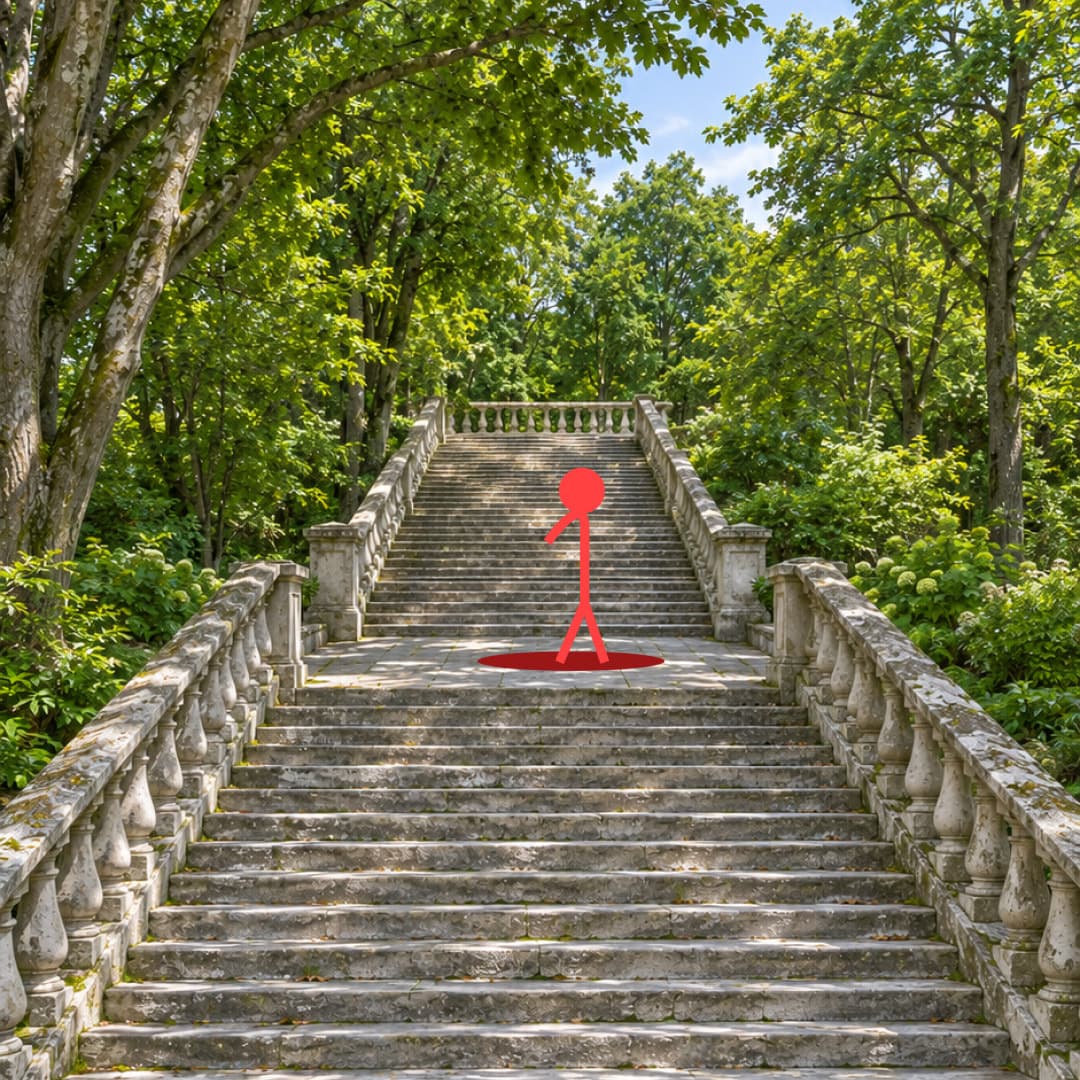
Красная фигура показывает положение героя на ровной площадке между лестничными пролётами.
После каждого черновика я проверяю:
- Узнаётся ли лицо во всех планах и сохраняется ли одежда.
- Стоит ли герой на площадке, сохраняется ли геометрия лестницы.
- Правильно ли руки держат меч и выглядит ли движение тяжёлого клинка убедительно.
- Появляется ли сертификат в нужный момент и остаётся ли видимым.
- Помещается ли финальная реплика до подъёма камеры к небу.
Конкретную ошибку лучше описать через положение или действие. Например, вместо «переставь героя повыше» указать ровную площадку между двумя лестничными пролётами и положение обеих ног. Исправленный вариант снова проверяй в Draft. К финальному разрешению переходи, когда устраивают сцена и движения.
Шаг 8. Запиши голос и собери звук
В моём результате русская речь получилась неудачной, поэтому я записал голос самостоятельно и заменил сгенерированную аудиодорожку. Финальная фраза звучит так: «И грамота, и медаль уже доступны в одном месте на платформе Nexfield Academy».
Подстрой запись под движения рта и длительность кадра. Если речь всё равно заметно расходится с артикуляцией, потребуется дополнительная правка видео. Одной замены звука для точного совпадения может не хватить.
После удаления исходной дорожки сцена потеряет и фоновые звуки. Я добавил атмосферу парка, взмахи меча, музыку и другие эффекты. Взмахи привяжи к прохождению клинка, а окружение оставь достаточно тихим, чтобы оно не перекрывало голос. Музыка в промте отключена: её удобнее подобрать при монтаже.
Если на сертификате исказились имя или надписи, точную графику можно наложить в видеоредакторе с учётом движения и перспективы. В финале проверь лицо, руки, логотипы, текст и синхронизацию звука.
Шаг 9. Адаптируй сцену под другой продукт
В рекламном кадре герой может держать сертификат, упаковку снеков, сковороду или чайник. На иллюстрации ниже показано, как меняется смысл одного и того же кадра при замене предмета.
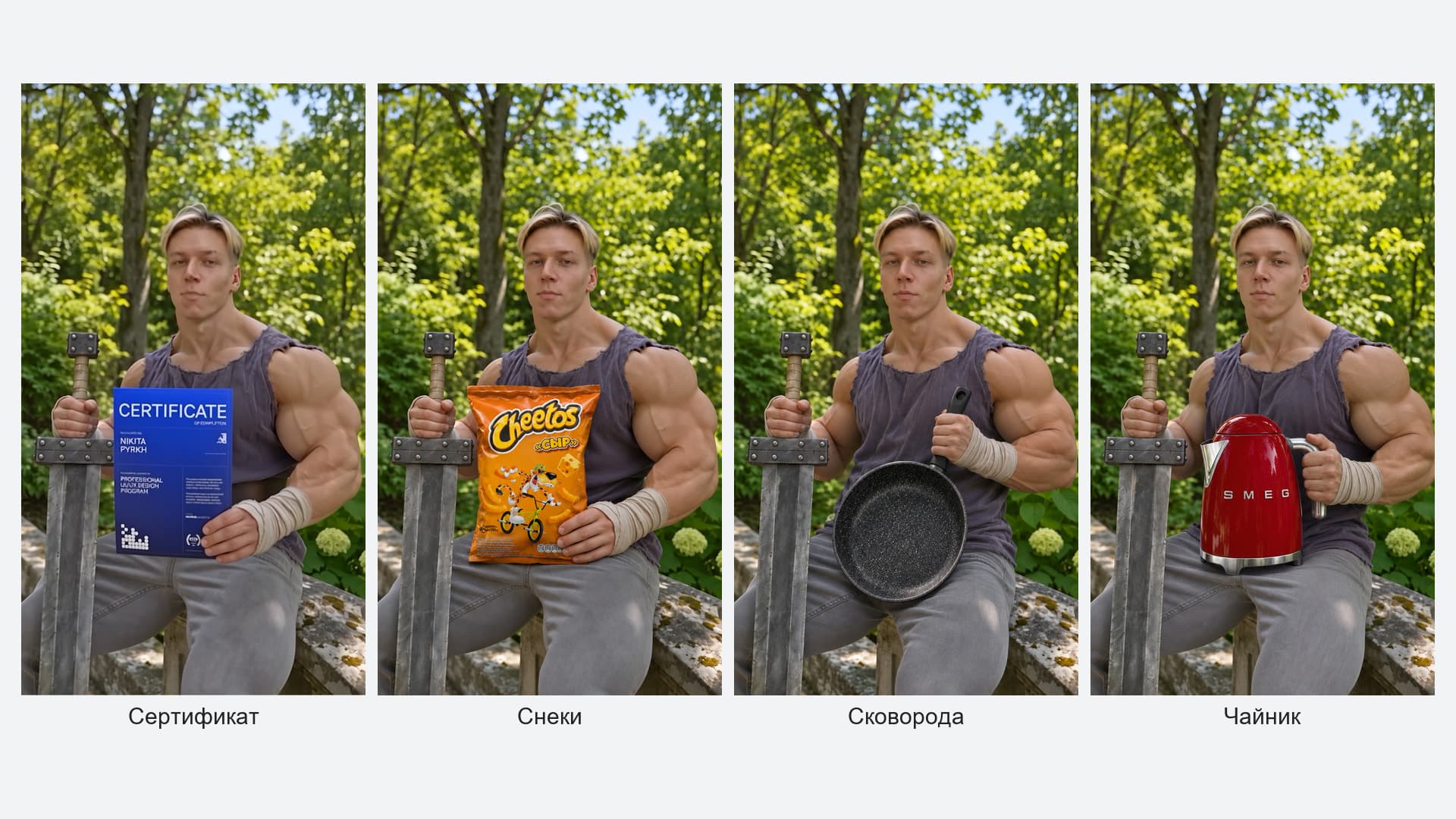
Четыре варианта рекламного кадра: с сертификатом, снеками, сковородой и чайником.
Чтобы повторить замену, загрузи изображение нового продукта отдельным элементом и перепиши блок с рекламным кадром. Замени ссылку на сертификат во всём промте, опиши способ удержания предмета, его масштаб и положение к камере. Затем адаптируй реплику под то, что рекламируешь.
Копировать положение рук из сцены с сертификатом для чайника или сковороды не стоит: у каждого предмета своя ручка, вес и форма. Проверь, что герой держит продукт естественно, а важные детали видны зрителю.
Начни со своей идеи, собери четыре референса и проверь действие в Draft. Когда сцена работает, доведи голос и звук в монтаже. Если хочешь подробнее разобраться в том, как выстраивать кадры и интегрировать AI в видеопроизводство, посмотри курсы Nexfield Academy по видео. Ещё один пример с персонажем и референсами найдёшь в пошаговом гайде по креативному AI-видео.