Как собрать первый экран сайта в Codex?
Собираем в Codex первый экран барбершопа, где стрижки переключаются на одном портрете. Семь промптов для стрижек и полный промпт интерфейса внутри.

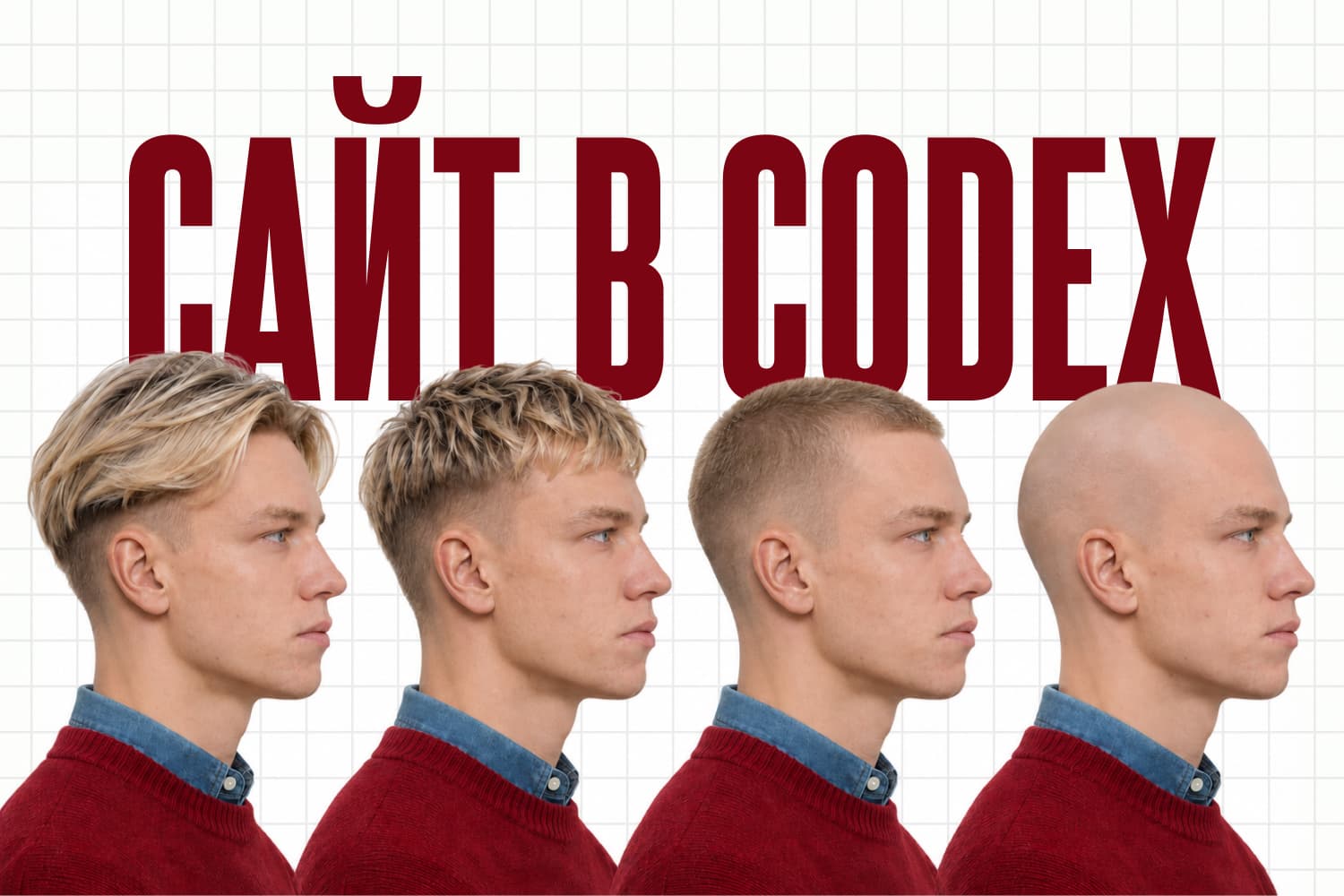
«С боков убрать, сверху чуть-чуть». Знакомая просьба, только у тебя и у барбера это «чуть-чуть» может выглядеть по-разному. Я собрал в Codex первый экран сайта, где можно переключать стрижки на одном портрете и сразу видеть, как меняется силуэт.
Покажу, как я подготовил портреты и собрал интерактивный экран KONTUR. Внутри семь самостоятельных промптов для стрижек и полный запрос для Codex на реализацию интерфейса.
Финальный экран KONTUR. В демонстрации при выборе карточки меняются портрет, название и описание стрижки.
Как появилась идея примерки
Всё началось с шуточного ролика про знакомых барберов. Так появилась «ВСПЫШКА» с «Бумбоксом» и вариантом для тех, кому вдруг захотелось побриться налысо. Пока я собирал ролик, понял, что на одном и том же лице удобно сравнивать стрижки и показывать мастеру, какую форму и длину ты имеешь в виду.
В барбершопе для такой примерки можно использовать фото клиента с его согласия на съёмку и обработку. Картинка помогает обсудить форму. Мастер подскажет, что получится с учётом длины, густоты и структуры волос.
«ВСПЫШКА». Здесь можно примерить полубокс и полностью бритую голову.
Подготовь базовый портрет
Я начал с листа персонажа и взял за основу крупный портрет слева. Из него сгенерировал один кадр 4:5 с поворотом головы на 90° вправо. В профиль хорошо видно, как меняются виски, затылок и объём сверху. Если важнее показать чёлку, попробуй ракурс в три четверти и сохраняй его во всей серии.
Для своего проекта возьми чёткое фото или готовый лист персонажа, внутри статьи есть промт для создания. В промпте Curtains замени приметы, цвет волос и одежду на свои или попроси сохранить их с референса.
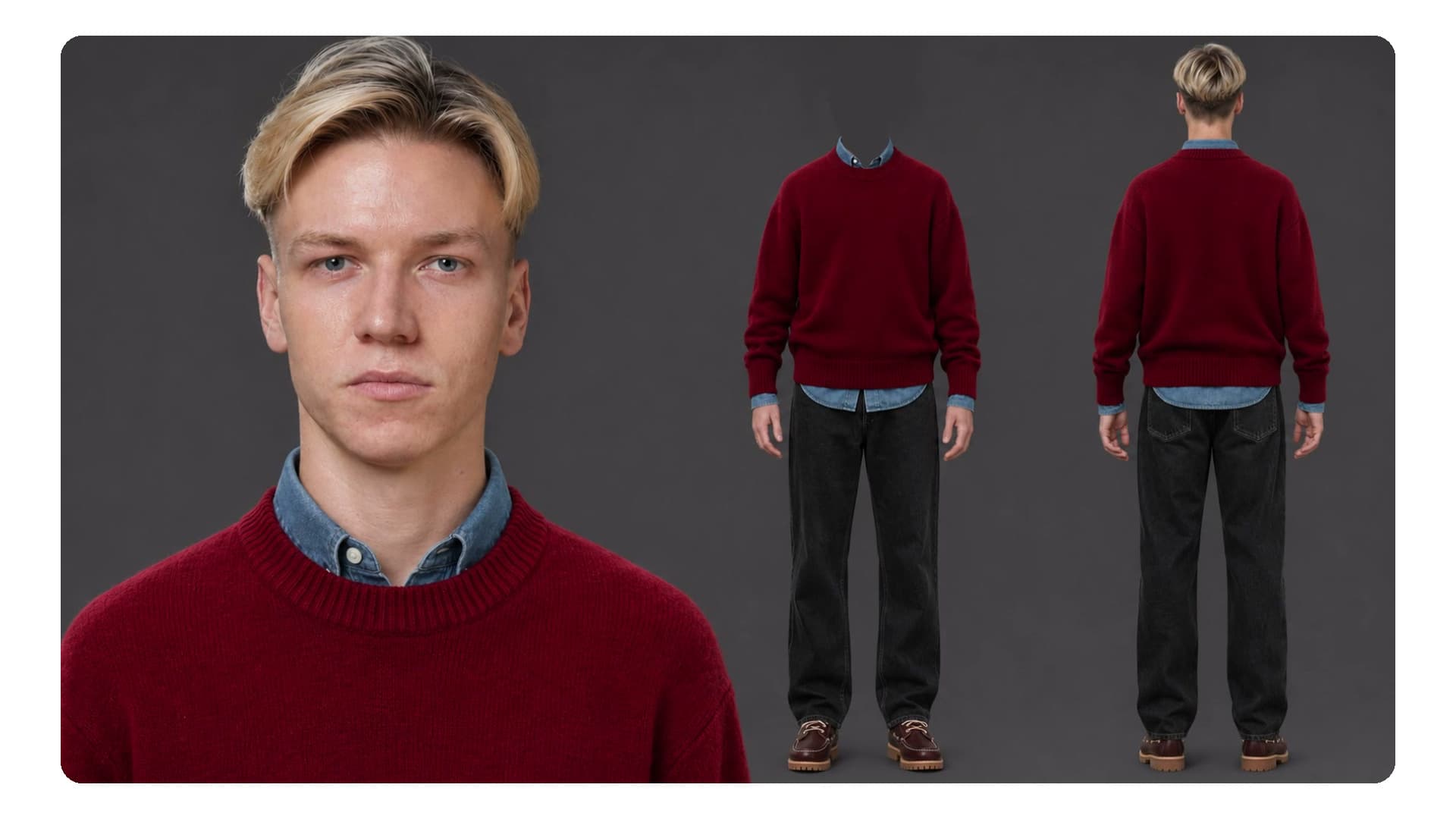
Лист персонажа из ролика. Для генерации профиля я ориентировался на крупный портрет слева.
Сгенерируй стрижки на одном профиле
Создай базовый профиль Curtains и прикрепляй его для каждой новой стрижки. В ChatGPT, Seedream или Nano Banana редактируй только волосы. Сохраняй лицо, свет, одежду и положение головы. Примеры ниже экспортированы на серый фон, для сайта я готовил отдельные прозрачные вырезки.
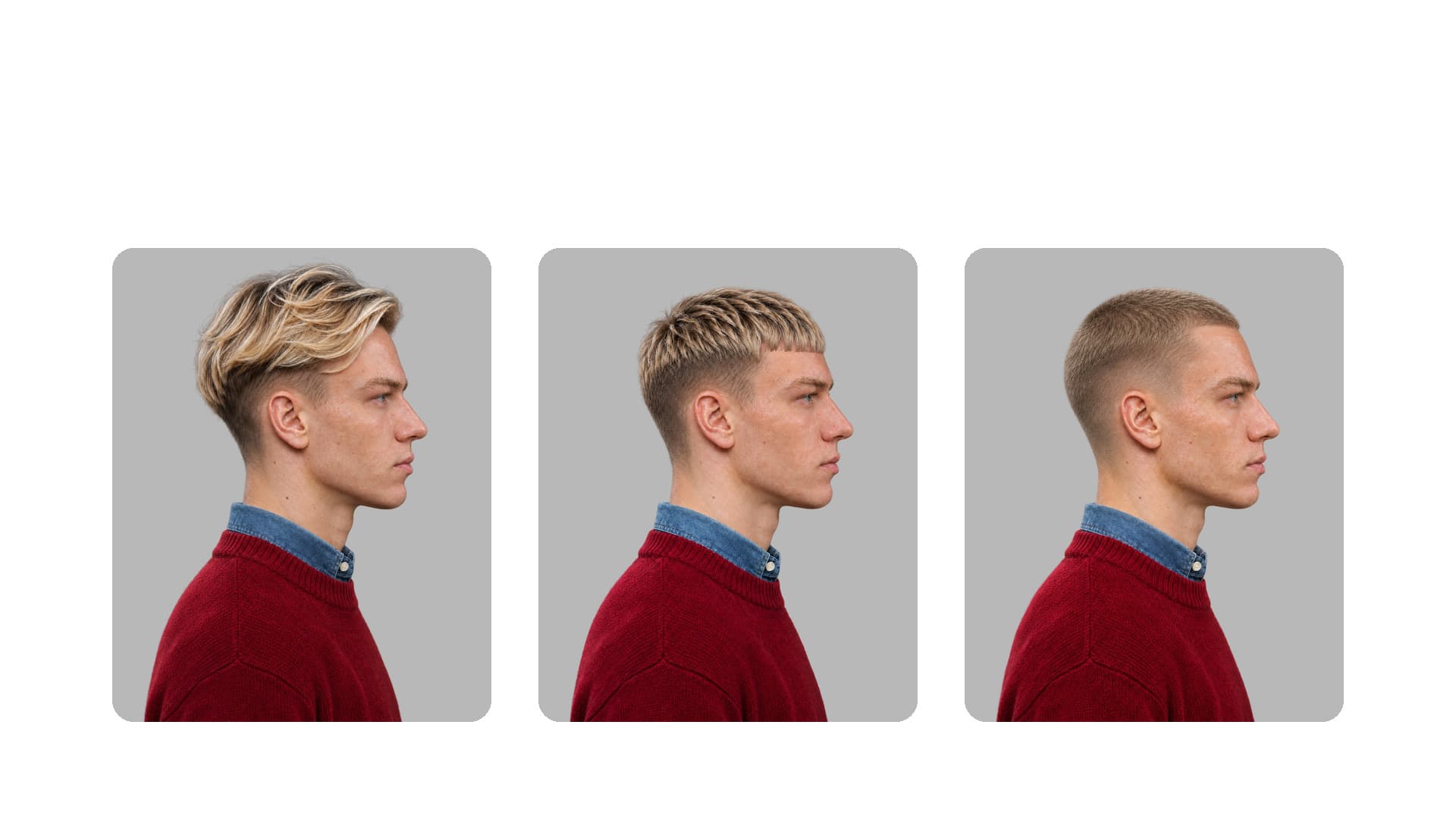
Curtains · French Crop · Buzz Cut
Curtains
Средняя длина, пробор и свободный объём. Во «ВСПЫШКЕ» этот вариант называется «С боков убрать, и сверху немного». Прикрепи лист персонажа или свою фотографию как основной референс внешности.
Используй промт
Use case: identity-preserving photographic reference for an interactive barbershop website. Use the supplied reference as the precise identity, wardrobe and studio-look guide, especially the large close-up on the left. Generate ONE premium photorealistic vertical 4:5 head-and-upper-torso studio photograph of this exact same adult male character turned into a strict 90-degree lateral profile, nose pointing to the RIGHT edge of the image. He has an angular straight nose, clean-shaven fair skin, the same bone structure, ear and brow from the reference, and wears the original deep crimson cable-free knitted crewneck over the original faded blue denim collar. Hair: medium length natural ash-blond curtains as in the source, softly swept back with a visible textured side contour and a tapered temple. Camera level, natural neck, neutral expression, 85mm portrait lens, subtle film grain, sharp natural skin and detailed knit. Matte charcoal grey (#424243) studio backdrop like the reference, very subtle soft light gradient, soft key from upper right. Entire hair and profile in frame, head centered at x=53%, crown around y=11%, eyes y=35%, chin y=57%, shoulders run off bottom edge. Medium close bust, strong profile silhouette, straight spine. Only one person, no other viewpoints, no words, borders or graphics.
French Crop
Короткая текстурная чёлка направлена вперёд, у висков плавный переход. Во «ВСПЫШКЕ» это «Ну ты крутой». Прикрепи цветной Curtains на сером фоне.
Используй промт
Use case: identity-preserve / precise-object-edit. Edit the supplied portrait directly as a localized replacement of the haircut only. New haircut: French crop with a short clearly forward-brushed textured ash-blond top and a blunt short choppy horizontal fringe at the forehead, short low taper. Short at the crown, no quiff, no swept-back strands. A visibly compact, forward silhouette. Everything outside the hair and immediate hairline area stays identical to the input, especially head angle and position, forehead below the hairline, ear position, gaze, eyebrow, nose, lips, jaw, neck and exact red sweater and blue denim. Identical 4:5 framing, right-facing 90-degree profile, same charcoal studio background, same pixel positions, exact same overall head size and torso. Do not move, zoom, rotate, crop, or recompute the face or body. Restore matching charcoal backdrop where volume is removed. Single photorealistic portrait. No graphics. This will be spatially registered with the input image to switch just the hair on a website.
Buzz Cut
Около 5 мм сверху с плавным переходом у висков и на затылке. Прикрепи цветной Curtains на сером фоне.
Используй промт
Use case: identity-preserve / precise-object-edit. Edit the supplied portrait directly as a localized replacement of the haircut only. New haircut: Very close 5 mm military buzz cut with a light natural ash-blond top and smooth low fade at the nape and around the sideburn. The rounded outline follows the skull, almost no added volume, matte natural short stubble. Everything outside the hair and immediate hairline area stays identical to the input, especially head angle and position, forehead below the hairline, ear position, gaze, eyebrow, nose, lips, jaw, neck and exact red sweater and blue denim. Identical 4:5 framing, right-facing 90-degree profile, same charcoal studio background, same pixel positions, exact same overall head size and torso. Do not move, zoom, rotate, crop, or recompute the face or body. Restore matching charcoal backdrop where volume is removed. Single photorealistic portrait. No graphics. This will be spatially registered with the input image to switch just the hair on a website.
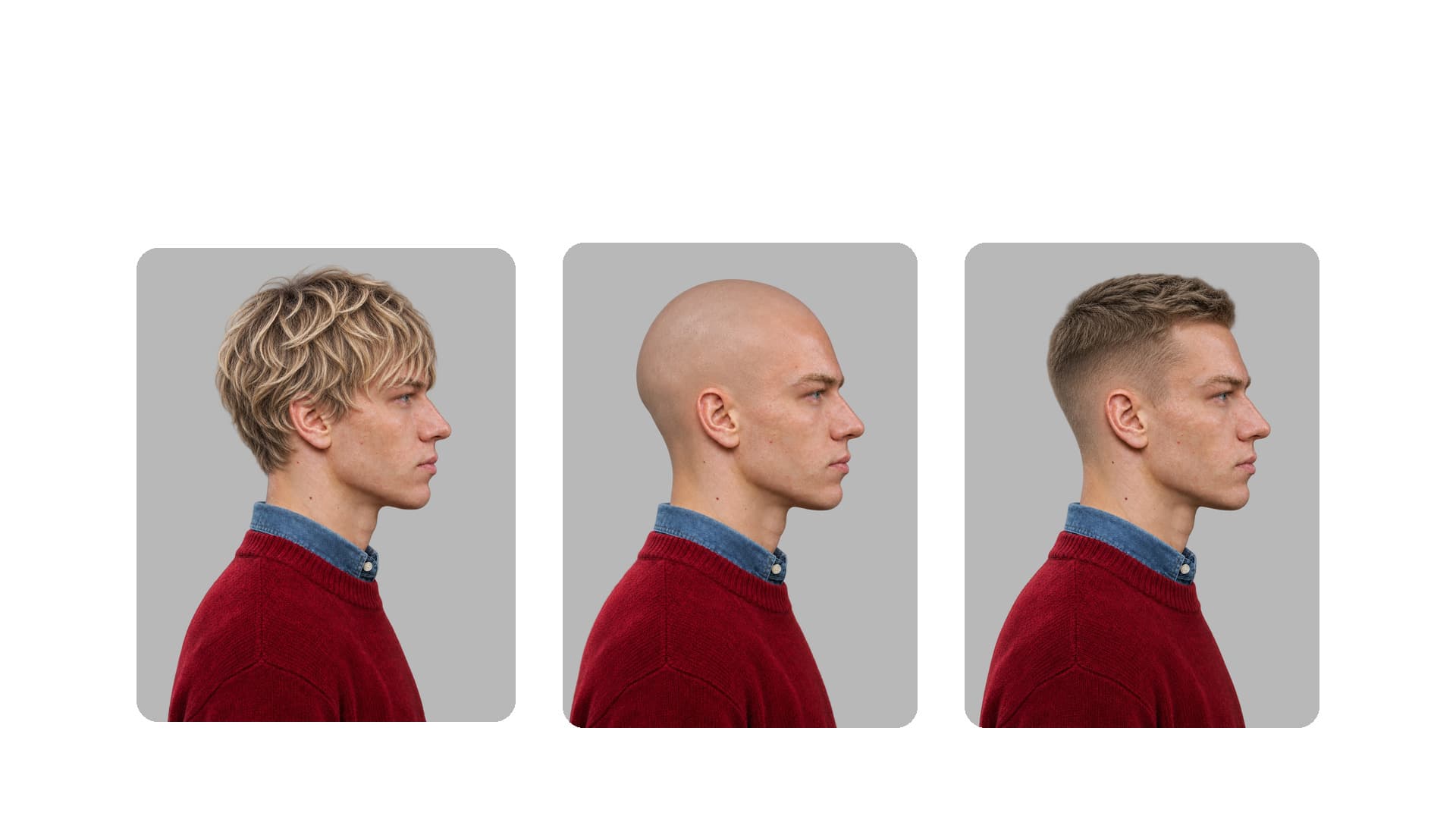
Mod Cut · Полностью бритая голова · Полубокс
Mod Cut
Слоистая форма, чёлка до бровей и удлинённые пряди около уха. Во «ВСПЫШКЕ» это «Не как у всех». Прикрепи цветной Curtains на прозрачном фоне.
Используй промт
Use case: identity-preserving localized haircut edit for a virtual barbershop try-on. Edit the exact supplied COLOR transparent right-facing profile. Replace only the haircut with a recognizable modern British MOD CUT: medium-length softly rounded shaggy shape, choppy swept-forward layered crown, textured eyebrow-skimming fringe with separated points, longer soft sides with a few wisps over the upper/back edge of the visible ear, and a slightly grown-out tapered nape stopping well above the denim collar. No skin fade, no harsh disconnected sides, no undercut or slick-back. Natural light ash-blond highlights with slightly darker roots just like the original. Keep the untouched portrait, normal skin tone, blue eye, ear location, forehead, nose, jaw, chin, neck, deep red knit sweater and blue denim shirt fixed pixel-for-pixel. Only hair may cover some of the temple and ear. Same exact 1122x1402 canvas, camera, framing, placement and scale. All background stays truly transparent, including areas around the new hair silhouette. Preserve realistic wispy alpha at the hair edges. High-quality color photographic portrait, no text, no matte or simulated background.
Полностью бритая голова
Гладкая голова без щетины и тени от волос. Во «ВСПЫШКЕ» это «Е*ашь!». Прикрепи цветной Curtains на прозрачном фоне.
Используй промт
Edit the supplied transparent color profile photograph. Change only the scalp and hair. Keep the exact same right-facing profile, placement and scale, the same ear and facial features, skin tone and texture, neutral expression, denim collar, red sweater, lighting, and transparent background. Output one high quality photorealistic transparent PNG, same 1122 × 1402 canvas and head position, no text, no objects, no compositing background. This will be used as a pixel-aligned hairstyle layer for a browser try-on. Replace all head hair, including the hairline and any sideburns, with a completely shaved bald scalp, smooth and clean with natural realistic skin texture and subtle tonal variations. Absolutely zero visible hair or buzzed stubble, no shaved shadow at the temples or nape. Reveal the natural rounded skull shape. Preserve the eyebrows, ear, face, neck, and sweater. Precisely preserve image framing.
Полубокс
Короткие бока и затылок, сверху примерно 2–3 см с лёгкой укладкой вперёд и вверх. Во «ВСПЫШКЕ» это «Бумбокс». Прикрепи цветной Curtains на прозрачном фоне.
Используй промт
Edit the supplied transparent color profile photograph. Change only the scalp and hair. Keep the exact same right-facing profile, placement and scale, the same ear and facial features, skin tone and texture, neutral expression, denim collar, red sweater, lighting, and transparent background. Output one high quality photorealistic transparent PNG, same 1122 × 1402 canvas and head position, no text, no objects, no compositing background. This will be used as a pixel-aligned hairstyle layer for a browser try-on. Replace the long swept blond hair with a recognizable men's poluboks (half-box) haircut. Neat athletic short cut; near-bare lower sides and nape with low taper, blended smoothly; a visibly fuller, compact top of about 2–3 cm of natural dark blond hair, brushed subtly up and forward, low flat silhouette with soft texture at the hairline. No long fringe, no hard disconnected part, no curls, no pompadour. The top must read as clearly longer than a buzz cut but shorter than a French crop. Precisely preserve image framing.
Slick Back
Волосы гладко зачёсаны назад, лоб открыт, у висков и на затылке длина плавно уходит на короткую. Этот вариант был в раннем KONTUR. Промпт составлен по записи экрана. Прикрепи цветной Curtains на сером или прозрачном фоне.
Используй промт
Edit the supplied color portrait as a localized hairstyle replacement for a browser haircut try-on. Change only the hair and its immediate transition into the hairline. Create a classic slick back with a medium-length top brushed smoothly from the forehead toward the crown, a controlled lift above the forehead and a continuous swept-back silhouette. Show fine, parallel comb lines, soft natural sheen, and the same hair color and roots as the source. Keep the forehead fully open, with no forward fringe, center part, hard part, loose curls, or high pompadour. Taper the sides and nape neatly, blending into the longer top without a disconnected undercut. Keep the exact same right-facing 90-degree profile, face, ear, eyebrows, skin texture, expression, neck, outfit, light, camera, placement, scale, and crop. Retain the input aspect ratio and canvas dimensions. If the input has a studio backdrop, restore that backdrop only where the old hair silhouette is removed. If the input is transparent, keep a true alpha channel and fine hair edges. Output one photorealistic portrait with no text or graphics.
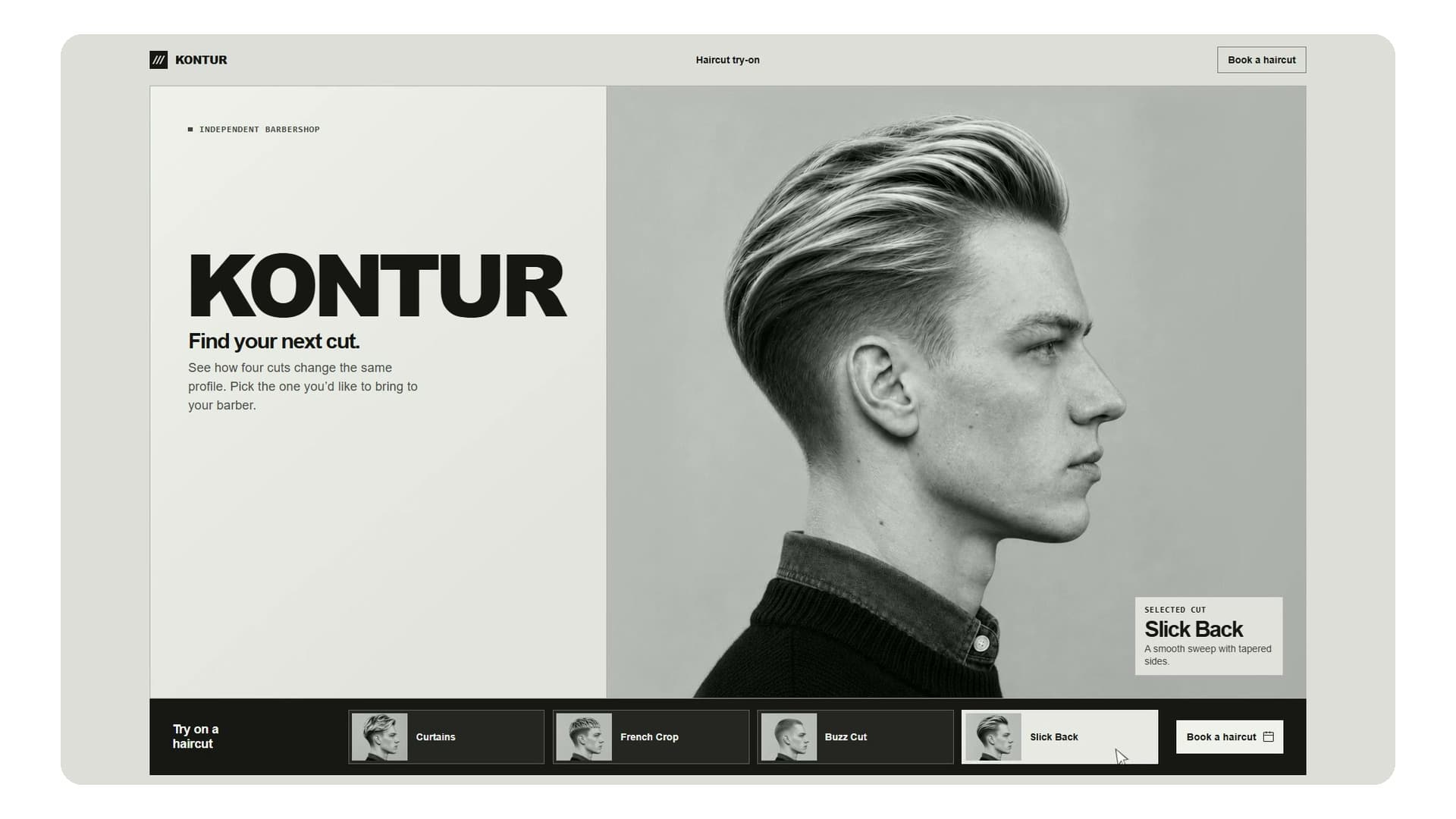
Slick Back в раннем KONTUR. Кадр из записи интерфейса.
Как применить этот подход к портфолио
Этот же лист персонажа я использовал в проекте с сайтом-портфолио. На своём сайте можно самому задать порядок кейсов и сразу показать, как ты работаешь с интерфейсом, движением и типографикой. Для клиента или работодателя это одна ссылка с твоими работами и способом связаться.
На новом курсе Nexfield Academy «Сайт-портфолио с AI» мы собираем такой проект с нуля. Планируем экраны в Figma, делаем аниматик в Blender, генерируем видео в Seedance и собираем сайт в Codex. По итогам курса у тебя будет рабочая ссылка на свой сайт и сертификат об окончании. Если никак не доходили руки до создания своего сайта-портфолио, то сейчас самое время!
Собери первый экран в Codex
Открой чат в папке проекта, приложи портреты и вставь промпт ниже. В финальном KONTUR первым идёт Curtains, за ним French Crop, Buzz Cut и Mod Cut. Для своего проекта укажи название барбершопа, порядок файлов и подписи. Число карточек должно совпадать с числом выбранных портретов.
Название бренда я поместил за вырезанным портретом, чтобы волосы перекрывали часть букв. Серый фон остался отдельным слоем. При выборе карточки одновременно обновляются портрет, подпись и активное состояние. В демоверсии кнопка записи открывает окно с выбранной стрижкой и сохраняет выбор на устройстве.
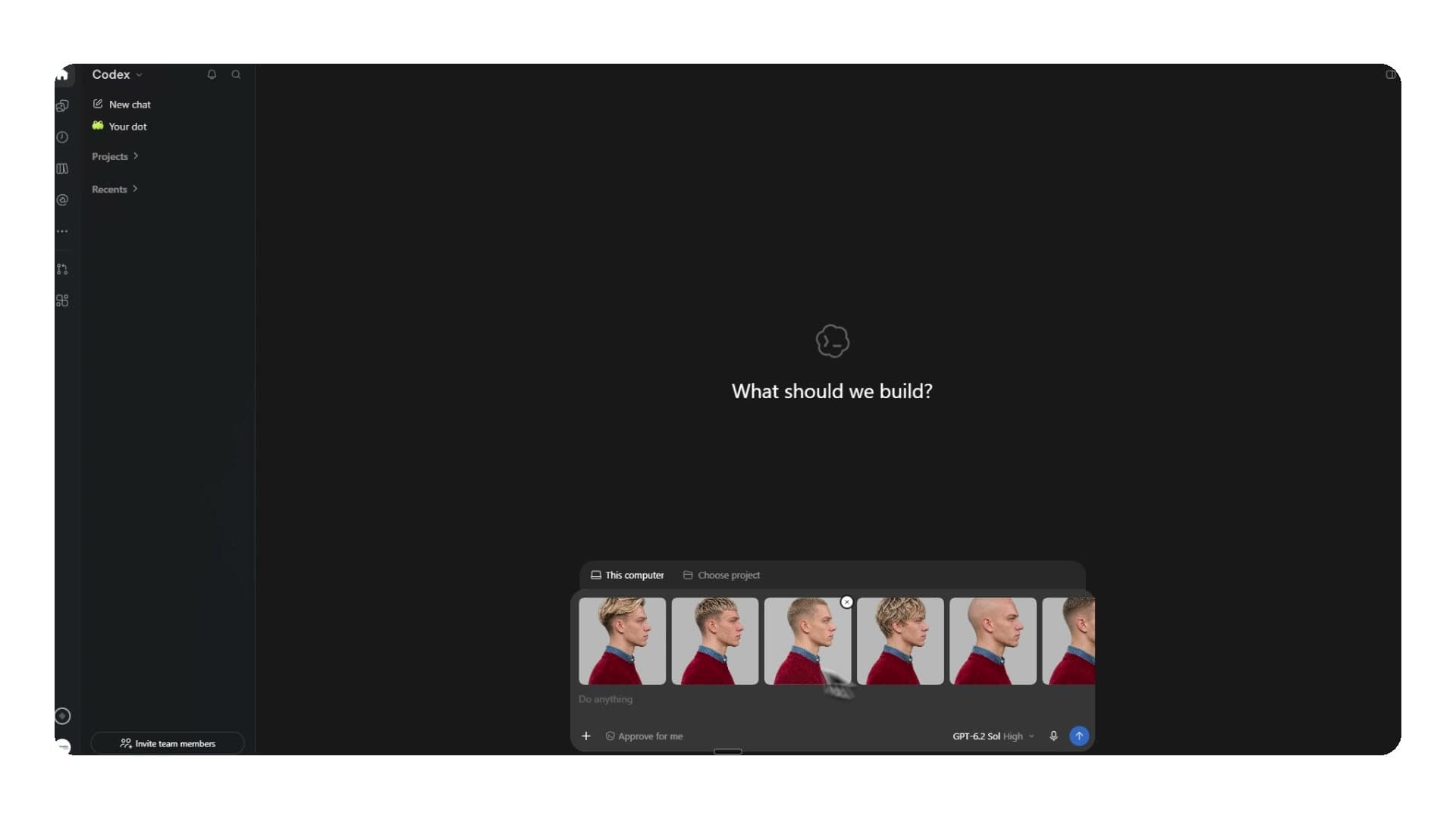
Вложения в Codex. Каждый выбранный портрет становится отдельным вариантом в переключателе.
Смотреть загрузку портретов в Codex
Полный промпт для интерфейса KONTUR
Используй промт
Build a working, responsive haircut try-on website based on the final English-language KONTUR design. Use my uploaded portraits as the site's actual assets. Deliver runnable source and a short local launch command. For a new project, plain HTML, CSS, and JavaScript are enough. If a project already exists, use its stack. ### Inputs - Use **KONTUR** as the default brand name. Apply any brand name I provide to the header, the oversized title, and the document title. - Each uploaded portrait represents one haircut. Use the order and labels I provide. Otherwise, use the upload order and short English labels that match the images. Use the first portrait as the initial selection, with an option to restore a previously saved choice. - Keep each cut in one data record with an `id`, portrait, thumbnail, label, short description, and accessible image text. If I supply only the full portrait, derive the thumbnail from the same asset. Store the assets locally with the site so the demo works independently of external image hosts. ### Desktop composition - Make a single screen consisting of a slim masthead, a large framed hero, and a dark control strip directly beneath the hero. Center the page in a shell about 1664 px wide at most, with responsive side gutters around 3vw. At 1920×1080, all three sections should fit in the frame. - Use warm gray `#dededb` for the page, near-black `#171716` for text, muted gray `#454543` for secondary text, charcoal `#181817` for the control strip, and red `#c52439` for the primary button. The hero has a thin `#a6a6a3` border and a neutral gray radial gradient, from `#d7d7d7` at about 52% across and 24% down, through `#c4c4c4`, to `#a5a5a5` at the outer edge. Preserve the natural color of the portrait assets. - Keep the masthead about 66 px high. On the left, place a small black square with three light diagonal slashes and a compact, bold wordmark. On the right, place an outlined **Book a haircut** button. - Treat the hero as an editorial cover. Put the brand name in giant, tightly tracked, uppercase black type. Keep it on one line, nearly edge to edge. Set its centerline roughly 29% down the hero and fit its width to the container. Put the title behind the portrait so the head and hair naturally cover part of the middle letters. - Place a large, centered, full-color portrait in front of the title. The original framing is a right-facing profile from the chest up, with the top of the image starting roughly 9% down the hero. The figure meets the bottom edge of the stage, where the clothing is cropped by the frame. Use the existing pose in my images, with an identical anchor and scale for every cut. - In the lower left, show a bold tagline and a short explanatory sentence. In the lower right, show the small uppercase label **Selected cut**, the active style in bold type, and its short description. Keep both text blocks on the gray stage and clear of the face. Use a clean rectangular layout, strong contrast, and a system sans-serif or Inter for the interface. Use an extra-heavy sans-serif for the title and a small tracked monospace font for the selected-cut label. - On the control strip, place **Try on a haircut** at the far left. Follow it with four equal-width cut cards and one equally wide red booking button in the original layout. Generate the actual card count from my uploads. Each cut card has a small rectangular portrait thumbnail on the left and its label on the right. Use `#292927` for inactive cards and `#e8e8e4` with dark text for the active card. Keep borders thin and corners square. Give the red **Book a haircut** button a small calendar icon. ### Portraits and interaction - Use transparent PNG or WebP portraits when available. If I provide gray-background JPEGs, prepare clean cutouts so that the oversized title remains visible around the head. Preserve skin tone, clothing, and fine hair edges. Keep the gray background in CSS, separate from the portrait. - Register portraits of the same person using stable visual landmarks such as the eye, nose, ear, and collar. Where the inputs line up closely, retain the base face and clothing and swap the hair using change-specific feathered masks. Where alignment differs visibly, switch to the complete aligned portrait so skin and silhouette edges stay clean. - Load and decode the new portrait before displaying it. When a card is selected, update the hero portrait, selected-cut label and description, booking thumbnail, and active-card styling together. Use semantic buttons with a visible keyboard focus indicator, `aria-pressed` for selection, and `aria-live="polite"` for the updated caption. - Both booking buttons open the same compact dialog. Show the active thumbnail and label under **Your cut**. If the site is a demo, display “This is a booking demo. Save your cut on this device to find it again later.” Provide a **Save my cut** button using `localStorage`, a visible confirmation, and a close button. Support Escape and restore focus to the button that opened the dialog. ### Motion and responsive layout - Run the entrance once, after the first portrait is ready. Start with the portrait rising from below the frame over about 780 ms. Fade the header and the two text blocks into place starting at about 470, 530, and 590 ms. At about 770 ms, lower the oversized brand name from above over 560 ms, behind the portrait. At about 1330 ms, reveal the dark control strip downward over 380 ms. Clip the portrait and title to the hero while they move. Render the stable final state when `prefers-reduced-motion` is enabled. - On compact screens, move the control-strip heading above the cards. On a phone, keep the brand title at the top of the scene, center the portrait beneath it, and softly fade the lower edge of the portrait before the two caption columns. The four original haircut cards and the red booking action share one compact row, with each thumbnail stacked above its label. If my asset count makes the row too narrow, wrap the tiles into additional rows while keeping the booking action last. Keep the complete layout free of horizontal scrolling. - Verify a 1920×1080 desktop view and a 390×844 mobile view. Check every image switch, the booking dialog, and the reveal order. Confirm that the entire control strip and the active cut are visible together in the desktop recording frame. ### Default copy for the original KONTUR version Use the exact copy below when I supply the matching portraits or ask to reproduce the original. For a different number of images, adapt the explanatory sentence to match the actual count. **Brand** KONTUR **Page title** Kontur Barbershop | Haircut Try-On **Tagline** Find your next cut. **Description** See how four cuts change the same profile. Pick the one you’d like to bring to your barber. **Selector heading** Try on a haircut **Caption heading** Selected cut **Booking action** Book a haircut | Position | Cut | Description | | --- | --- | --- | | 1 | Curtains | A center part with loose volume. | | 2 | French Crop | A short fringe with a textured top. | | 3 | Buzz Cut | A close cut with a soft fade. | | 4 | Mod Cut | A textured fringe with soft, longer sides. |
Сравни первый вариант и финальный экран
В первом KONTUR я развёл текст и чёрно-белый портрет по двум колонкам. В финале вернул цвет, перенёс крупный заголовок за портрет и выделил кнопку записи красным. При загрузке сначала поднимается портрет, затем появляется заголовок, а в конце раскрывается панель выбора.
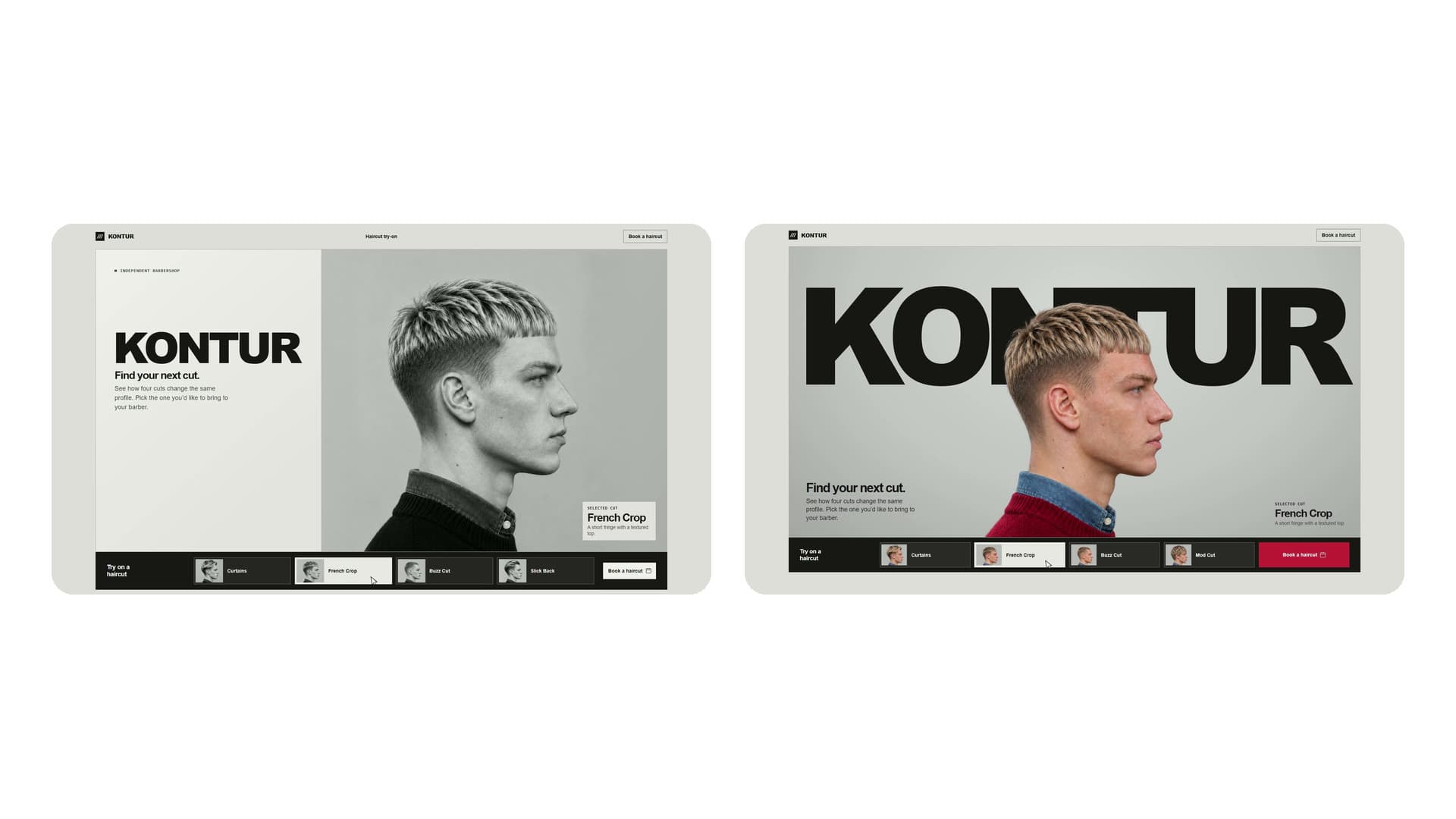
Одна стрижка French Crop в обеих версиях. Слева двухколоночный экран, справа цветной портрет поверх названия.
Что проверить перед показом
- Быстро переключи стрижки. Если глаз, ухо, нос или воротник скачут, выровняй портреты по этим точкам и проверь, что у всех файлов одинаковый масштаб.
- Открой экран на телефоне. Убедись, что карточки и кнопка записи помещаются по ширине и выбранную стрижку легко заметить.
- Открой окно записи с разными стрижками. Проверь, что внутри показан выбранный вариант. Если добавляешь появление элементов, проверь экран в режиме с уменьшенной анимацией.
Для первого теста хватит базового профиля и одной стрижки, которая заметно от него отличается. Когда они переключаются без скачков, добавляй остальные.
Если хочешь прокачать свои навыки и освоить вайбкодинг, залетай на курсы в Nexfield Academy, где помимо Codex, мы разбираем ещё несколько актуальных инструментов с различными юзкейсами.